You walk into a Korean restaurant, smile at the staff, and they point at a tablet on your table or a screen by the door. Welcome to the 키오스크 (kiosk). In a lot of Korean restaurants and cafés, you order and sometimes pay on a touchscreen instead of with a server. It’s fast once you know the words. Here’s a walk through a real restaurant kiosk from a Korean fried chicken shop in Seoul, screen by screen.
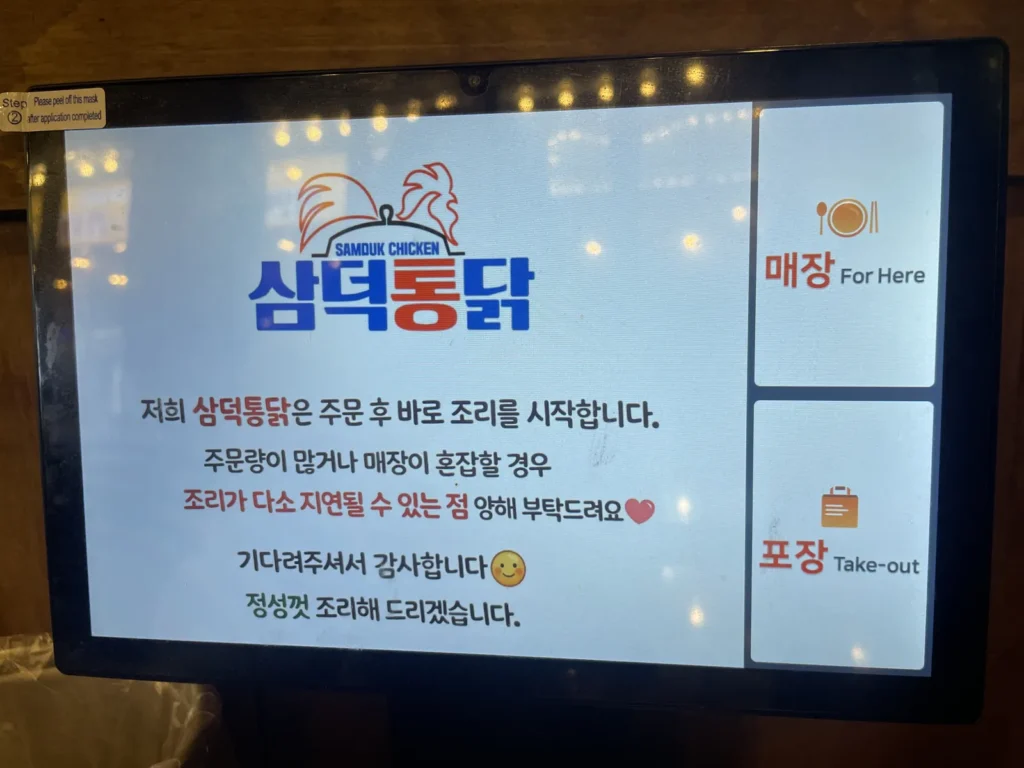
Step 1: 매장 or 포장? (For here or to go?)
The very first screen almost always asks one question:
- 매장 (maejang): eat in. Literally “the store.”
- 포장 (pojang): take-out. Literally “packaging, wrapping.”
This kiosk helpfully added English under each button, but many don’t. If you remember only two words from this post, make it these two. You’ll hear them at cafés too: a cashier asking 드시고 가세요? (Deusigo gaseyo?) means “Eating here?” and the answer is 네, 먹고 갈게요 (Ne, meokgo galgeyo), “Yes, I’ll eat here,” or 포장이요 (Pojang-iyo), “To go.”
The text on this screen is a nice reading exercise, too: 주문 후 바로 조리를 시작합니다, “We start cooking right after you order,” and 조리가 다소 지연될 수 있는 점 양해 부탁드려요, “Please understand that cooking may be a little delayed.” 양해 부탁드려요 is a very common polite phrase on Korean signs.
Step 2: Pick a category
The menu runs down the left side. On this chicken kiosk:

| Korean | Romanization | Meaning |
|---|---|---|
| 세트메뉴 | seteu menyu | set menus |
| 뼈닭 | ppyeodak | bone-in chicken |
| 순살 | sunsal | boneless |
| 스페셜 | seupesyeol | specials |
| 사이드 | saideu | sides |
| 사리 & 소스 | sari & soseu | add-ons and sauces |
| 생맥주 / 병맥주 | saengmaekju / byeongmaekju | draft beer / bottled beer |
Many menu names are English loanwords written in Hangul: 세트 (set), 스페셜 (special), 사이드 (side), 소스 (sauce). Try reading them out loud. Half the menu suddenly makes sense.
Step 3: Tap a dish and add it to the cart
Tap a photo, choose any options, then add it to the 장바구니 (jangbaguni), the shopping cart. The word literally means “market basket,” and it’s the same word online shops use.

Two labels to watch for:
- 일시품절 (ilsi pumjeol): temporarily sold out. On this kiosk, one add-on was greyed out with this label.
- 추가 (chuga): add, extra. For example, 공기밥 추가, “add a bowl of rice.”
Step 4: Check your order and pay

The cart screen lists what you chose. Then you’ll see buttons like:
- 주문하기 (jumunhagi) or 결제하기 (gyeoljehagi): order / pay
- 카드 결제 (kadeu gyeolje): pay by card
- 취소 (chwiso): cancel
- 처음으로 / 처음화면 (cheoeum-euro / cheoeum hwamyeon): back to the start
Some table kiosks let you pay at the end instead, at the counter. If you’re not sure, the button 직원호출 (jigwon hochul), “call staff,” is your friend. This kiosk had it at the bottom left, next to a LANGUAGE button. Look for that one first: many kiosks offer English, Chinese or Japanese.
Small details that confuse people
- The timer. The top of this kiosk showed 남은시간 112초, “time left: 112 seconds.” If you wait too long, the screen resets to the start. Don’t panic; just begin again.
- Table number. 테이블-1 in the corner means the tablet is linked to table 1. Food comes to your seat.
- Order history. 주문내역 (jumun naeyeok) shows what you already ordered, handy when you want another round.

Phrases for when the kiosk wins
- 이거 어떻게 해요? (Igeo eotteoke haeyo?): How do I do this?
- 영어 메뉴 있어요? (Yeong-eo menyu isseoyo?): Is there an English menu?
- 카드 결제 돼요? (Kadeu gyeolje dwaeyo?): Can I pay by card?
- 주문 좀 도와주세요. (Jumun jom dowajuseyo.): Could you help me order?
Staff help with this all day. Asking is completely normal.
Kiosk words cheat sheet
| Korean | Romanization | Meaning |
|---|---|---|
| 매장 | maejang | for here |
| 포장 | pojang | to go |
| 장바구니 | jangbaguni | cart |
| 주문하기 | jumunhagi | order |
| 결제 | gyeolje | payment |
| 추가 | chuga | add, extra |
| 일시품절 | ilsi pumjeol | temporarily sold out |
| 직원호출 | jigwon hochul | call staff |
| 처음으로 | cheoeum-euro | back to start |
Screens and prices are from the kiosk I used in November 2026. Every restaurant’s kiosk looks a bit different, but these words come up again and again.
Keep exploring